TradingView Indicator News: Week of 24 November 2026
Summary: The week of 17 to 24 November 2026 was a busy one for TradingView indicator users. AI Copilot can now explain any part of the chart you select, script settings can be docked beside the chart, Pine Script gained built-in variables for detecting the market aggressor, and volume arrived for more than 2,300 CRYPTO coins. Outside TradingView, LuxAlgo brought its Quant coding agent into AI assistants and launched Vela on iPhone and Android. Below are the details, with dates and links to the official announcements.
Every item was checked on the official source (TradingView's blog, the Pine Script release notes, and LuxAlgo's own blog and changelog) on 25 November 2026. For the earlier part of the autumn, see our November 2026 industry roundup.
TradingView: AI Copilot reads the part of the chart you pick
AI range (24 November 2026)
What happened: TradingView added AI range to Supercharts. You click the AI range icon in the drawing panel, select a date range on the chart, and pick one of three suggestions: "Explain this price move", "Find events behind this move" or "Analyze technicals in this area". You can also type your own request, such as asking Copilot to mark support and resistance inside the range, and it adds the drawings to the chart. Copilot's tools now look up records from the selected period, so news searches return headlines from those dates rather than only the latest items. TradingView also says Copilot now answers at least twice as fast. AI range works on web and desktop with the AI Copilot add-on on any paid plan.
Why it matters: you no longer have to describe a move in words ("the drop in early March"). Pointing at the exact candles gives the assistant a precise question, which makes post-move reviews and journaling faster. As with any AI answer, the explanation is a starting point to check, not a verdict.
TradingView: indicator settings and scripting
Dock script settings to the right panel (24 November 2026)
What happened: a script's settings no longer have to sit in a dialog on top of the chart. A new Dock to right button moves the settings into the right panel, with all the usual tabs, while the chart stays fully visible. Clicking the settings of another script swaps it into the same panel.
Why it matters: tuning an indicator is easier when you can see each change on the chart as you make it. For indicators with many inputs, such as signal tools with stop and target options, this removes a lot of opening and closing.
Pine Script: variables for aggressor detection (November 2026)
What happened: the Pine Script release notes for November add a built-in aggressor_side variable on the "1T" (one-tick) timeframe. It equals aggressor.buy when the current aggressor is a buyer, aggressor.sell when it is a seller, and na when the aggressor is unknown or the timeframe is higher than 1T. An aggressor is the side that takes liquidity by trading against orders already in the book.
Why it matters: together with the tick-based calculations for Footprint, Volume Delta and CVD that TradingView added on 13 November, this gives script authors a cleaner way to separate buying from selling pressure instead of inferring it from candle direction. Expect more order-flow indicators to use it.
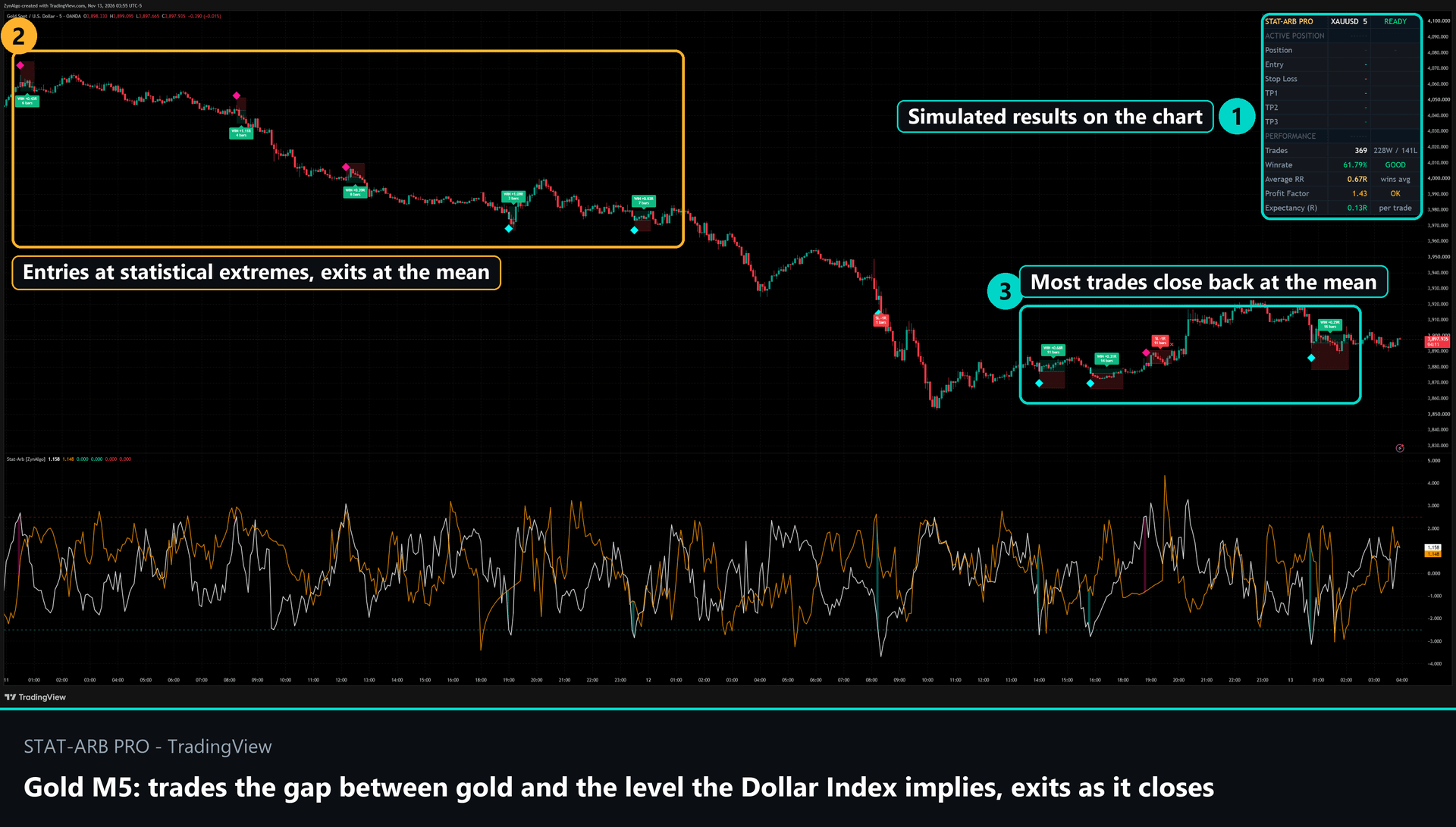
STAT-ARB Pro TDV
Trades gold's deviation from the level the Dollar Index implies and exits as the gap closes. Rolling regression spread, Auto preset for M5 and M15, closed-candle signals with a stop and a mean exit.

TradingView: new data on the chart
- Options expected move (18 November 2026): a new Options expected move indicator, found in the Options tab of the Indicators menu, turns the at-the-money implied volatility of each expiration into upper and lower price bounds on the underlying's chart. The bounds form a cone that widens with time, by default for expirations within the next month at one standard deviation.
- Volume for CRYPTO coins (20 November 2026): TradingView now calculates trading volume for more than 2,300 coins with the CRYPTO prefix, summed in US dollars across the spot pairs on exchanges available on the platform. Volume works on charts, in the Screener, on the Heatmap and on crypto market pages, and the
volumevariable now works for these symbols in Pine Script, so tools such as Volume Profile, VWAP and OBV can run on them. - Tab groups in TradingView Desktop (19 November 2026): Desktop 3.5 and later can save sets of tabs as groups, up to 10, and switch between them in one click. Groups are stored on your computer and do not sync between devices.
Why it matters: crypto traders who chart CRYPTO index symbols can now run volume-based indicators on them, and stock and options traders get the market's own range estimate next to their technical levels.
LuxAlgo: Quant moves into AI assistants and onto phones
Quant in AI assistants (19 November 2026)
What happened: LuxAlgo's changelog lists that Quant, its coding agent, now works inside ChatGPT and other AI assistants connected to LuxAlgo. From the assistant you can write and check Pine Script, search and open your saved scripts, plan, start and stop Backtest Loops, and ask for a loop's best strategy with its code and backtests. It uses the same Quant usage as working in Vela.
Vela on iPhone and Android (24 November 2026)
What happened: LuxAlgo released Vela as a mobile app for iPhone and Android, free to download. It uses the same account, watchlists and chart workspaces as the web version, opens on a live watchlist, delivers Price Alerts and Custom Alerts as notifications, and includes Quant beside the chart. This follows the desktop apps released on 3 November.
Why it matters: LuxAlgo is putting its tools wherever traders already are: its own platform on every device, and its agent inside general AI assistants.
Three things to take from this week
- AI is getting more precise, not just more available. Selecting a range on the chart and pulling news from those exact dates is a step from "chat about the market" to "explain these candles".
- Order flow keeps getting better data. Aggressor detection in Pine Script and tick-based delta both point to more accurate buy and sell pressure in scripts.
- Small workflow fixes add up. Docked settings and tab groups do not change any signal, but they make testing and comparing indicators less tiring.
What this means for traders
- Check plan and add-on requirements. AI range needs the AI Copilot add-on on a paid plan, and tick-based order flow needs the Ultimate plan.
- Verify AI explanations. An explanation of a past move is a hypothesis. Compare it with the actual news timeline and your own levels.
- Re-test volume tools on crypto. If you use CRYPTO symbols, volume-based indicators that showed nothing before may now plot. Check them on your timeframe before relying on them.
Where ZynAlgo fits
ZynAlgo builds focused TradingView indicators, each with a full manual. Traders interested in buying and selling pressure can look at Footprint Pro TDV and Tick Delta Pro TDV, and docked settings make it easier to tune signal tools such as Trendline v5.0 TDV while watching the chart. You can try the style with the free indicators.
FAQ
What is AI range on TradingView?
AI range, added on 24 November 2026, lets you select a date range on the chart and ask AI Copilot to explain the move, find events behind it, or analyze the technicals in that area. It requires the AI Copilot add-on on a paid plan.
Can I keep indicator settings open while viewing the chart?
Yes. Since 24 November 2026, the Dock to right button in a script's settings moves them into the right panel so the chart stays fully visible.
What does aggressor_side do in Pine Script?
On the 1T timeframe, aggressor_side tells a script whether the current aggressor is a buyer (aggressor.buy) or a seller (aggressor.sell). It returns na when unknown or on higher timeframes.
Trading involves risk; indicators support decisions, they do not guarantee results.
STAT-ARB Pro TDV
Trades gold's deviation from the level the Dollar Index implies and exits as the gap closes. Rolling regression spread, Auto preset for M5 and M15, closed-candle signals with a stop and a mean exit.