HalfTrend Pro TDV: A Trend Reversal Indicator With Built-In Stop and Target Levels
You are watching a trend indicator that has flipped color three times in the last twenty candles, and you still cannot tell which flip is worth acting on, or where you would even put a stop if you took it. That is the real problem. It is not a shortage of signals, it is the absence of a plan attached to the signal that survives past the entry click. A trend reversal indicator with built-in stop and target levels is meant to solve a narrower question than "where is the trend," it answers "now that the trend has actually turned, what do I do next."
The obvious fix, tightening the settings so the line reacts faster, makes this worse, not better. A faster line flips more often, which means more decisions, not fewer, and each one still needs a stop and a target worked out by hand in the seconds after it prints. The problem was never reaction speed. It was that every flip looked identical on the chart, with no distinction between one that survived structure and one that was noise.
What a trend reversal indicator with built-in stop and target levels actually does
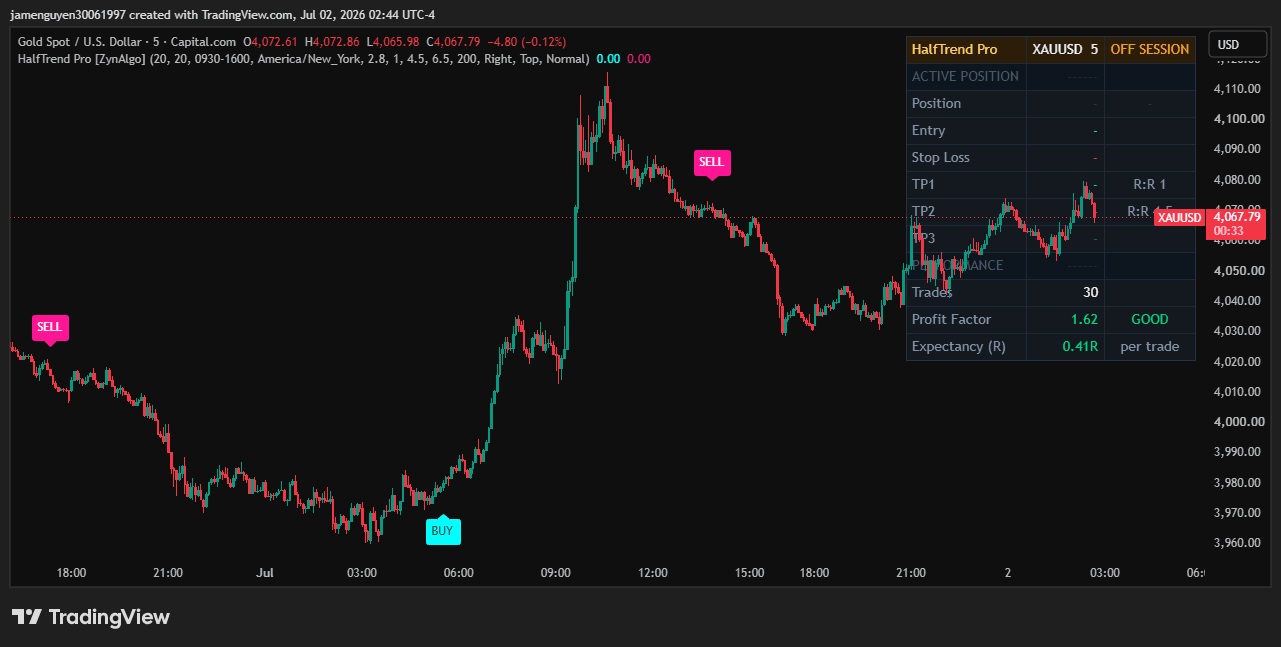
HalfTrend Pro (ZynAlgo) tracks the highest high and lowest low over a Structural Lookback window, blends them with moving averages of the highs and lows, and only lets the trend state switch when price closes decisively on the other side of that structure. The raw calculation line stays hidden by default. What you see instead is a BUY tag printed below the bar the moment the trend flips up, or a SELL tag above the bar when it flips down.
Each flip comes with a plan already drawn:
- The open of the bar after the flip becomes the entry reference, shown as a dashed line, so the trade is measured from a real, tradable price rather than the signal bar itself.
- A protective stop is placed an ATR-scaled distance away, floored at one tick so it is never zero.
- Up to three targets are projected at your chosen risk-to-reward ratios and drawn as lines above or below entry.
- Once the first target is hit, the stop shifts to break-even for the remaining targets.
- A trade that neither stops nor reaches target within your Max Bars In Trade setting is closed, and an opposite flip force-closes the current position before the new one opens.
A dashboard in the corner tracks the current state (READY, LONG, SHORT, or OFF SESSION), the live position with its stop and targets, and performance figures: trades taken, a profit factor graded GOOD, OK, or POOR, and expectancy in R per trade for the current settings.
How it plays out in a real session
Say you are watching a 15-minute EUR/USD chart with the default Session Filter left on, which restricts new entries to the New York cash session. Outside that window the dashboard header reads OFF SESSION and no new trade opens, though a position already running still manages itself to its stop, target, or timeout. When price closes through the prior structural low during the session, a SELL tag prints below the bar. The entry reference is the next bar's open, the stop sits an ATR-scaled distance above it, and TP1 through TP3 are already drawn below. If TP1 fills, the stop moves to break-even and the rest of the trade rides with the remaining targets covering the risk on the table.
HalfTrend Pro TDV
Mark trend flips and automatically project entry, stop loss and profit targets on your chart so the trade plan is ready before you decide to act.

Who this fits
- Trend and swing traders who want to act in the direction of a confirmed turn rather than fade or scalp every wobble.
- Plan-first traders who want the entry, stop, and targets drawn the moment a signal fires, not improvised afterward.
- Traders who size positions from risk, since the ATR-scaled stop and R:R targets frame the trade before it is taken.
- Session traders who only want signals inside the hours they actually watch the market.
What it does not do
The flip is a structural read, not a prediction. A signal only prints after price has closed decisively past the prior structure, so you are always entering after the turn has started, never at the exact low or high. A longer Structural Lookback holds the trend longer and flips less often, which cuts down whipsaws but also means later entries; a shorter one flips faster but produces more false turns. That trade-off is yours to set, the tool does not resolve it for you.
The dashboard's trade count, profit factor, and expectancy describe how the current settings have behaved on this market and timeframe up to now. They are not a forecast, and past behavior does not predict future performance. In a range-bound market with no real directional structure, flips can cluster and stop out in quick succession, since the tool has no separate mechanism for detecting a non-trending regime. It is also not built for traders who want sub-minute scalping entries independent of a directional flip, or for anyone looking for a fully discretionary charting tool with no signal framework at all.
Trading involves risk, and nothing in this article or in HalfTrend Pro is investment advice. Signals, levels, and tracked statistics are analytical references only, and you are responsible for your own plan and position sizing.
Pairing with other tools
HalfTrend Pro's job stops at the flip and the plan around it. It does not measure where volume actually built inside a level, or how far price has stretched from its volume-weighted mean. Traders who want that additional context on the same chart sometimes look at Micro-Profile TDV, which shows a volume distribution inside order blocks so you can see which part of a zone actually held volume, or Volume Deviation Bands TDV, which measures price's distance from a volume-weighted mean price in the market's own units. Neither changes what a HalfTrend Pro signal is; they simply give you a different lens to look through before deciding what to do with it.
If the gap in your current setup is exactly this, knowing a trend has turned but not what to do about it, HalfTrend Pro is worth a look on the ZynAlgo marketplace.
HalfTrend Pro TDV
Mark trend flips and automatically project entry, stop loss and profit targets on your chart so the trade plan is ready before you decide to act.